
2016-2017 MacBook Pro Dust Gate Repair in Philadelphia
There is an issue that affects primarily 2016 through 2020 models of the MacBook Pro that has been dubbed Dust Gate. The issue affects the display when dust gets trapped around the cable that leads from the display to the MacBook Pro logic board. If the debris in the dust is thick enough, it pushes against the cable when the computer is opened and closed, causing stress to the cable. Often times the stress results in small holes in the cable itself.
There is some nuance to diagnosing the Dust Gate issue as the symptoms present can be caused by a few different things. Keep in mind that if there was any physical hit to the computer before the symptoms started, it is very likely not a Dust Gate issue but rather an issue that requires an LCD panel replacement.
Dust Gate can cause a couple of symptoms:
- Bar on the screen – Usually there is somewhat of a pattern of bars on the screen when Dust Gate is the culprit. There are also usually accompanying fine horizontal lines as well.
- Noise with many moving lines but no crack – if your screen looks like an old TV set that isn’t getting good service, Dust Gate could be the issue.
Note we only have to diagnose a screen in person to be certain if it requires Dust Gate repair or an LCD replacement service.
Dust Gate REPAIR OPTIONS
There are currently three options for repairing a computer that has the Dust Gate issue.
- We can repair the cable that is damaged. This is not always possible depending on where the damage is, but when it is possible this is the cheapest option.
- When it is not possible to repair the cable, the next best option is to replace the LCD panel. The cable that gets damaged in a Dust Gate situation is part of the LCD panel, so by replacing that panel we replace the damaged cable as well.
- Replacing the display assembly is the final option for fixing an issue caused by Dust Gate. By replacing the entire display assembly, the LCD panel is changed, which in turn means the cable that is causing the issues is changed as well.
MacBook PRO Dust Gate FIX COST
There are a couple of ways to fix the Dust Gate issue, so the price of the repair is determined by the route taken to fix the issue.
- Here at MackTechs, we offer our Dust Gate repair service for $249. Note we only have to diagnose a screen in person to be certain if it requires Dust Gate repair or an LCD replacement service.
- Our service comes with a 1-year warranty. This service repairs the cable that gets damaged and reattaches the connection that was lost. We offer the service to our clients locally, as well as nationwide through our mail-in mac repair service.
- Apple will normally charge between $475-900 for the full display replacement on computers with this issue. Apple has a 90-day warranty on its repairs.
At MackTechs, we offer the best value for Dust Gate repair with our affordable service that comes with a 1-year warranty. Other shops usually charge more for the entire display assembly to accomplish the same results, but we utilize our experience and expertise to repair just the component that is broken.
You do not have to have an appointment to bring your computer by our shop. We also offer the repair nationwide via our mail-in service.
2017 A1708 MACBOOK PRO Dust Gate CASE STUDY
A local customer found us on Instagram and came by our shop for our free diagnosis. They reported their screen was not cracked at all, but was showing lots of lines and was completely unusable.
When the device was brought in, we observed many lines and bars distorting the image on the screen. After a thorough inspection, we found that dust and debris had entered the display flex cables, which caused damage over time. Basically, a few of the different data lines were broken by the damage caused by the debris being pushed against the cable.
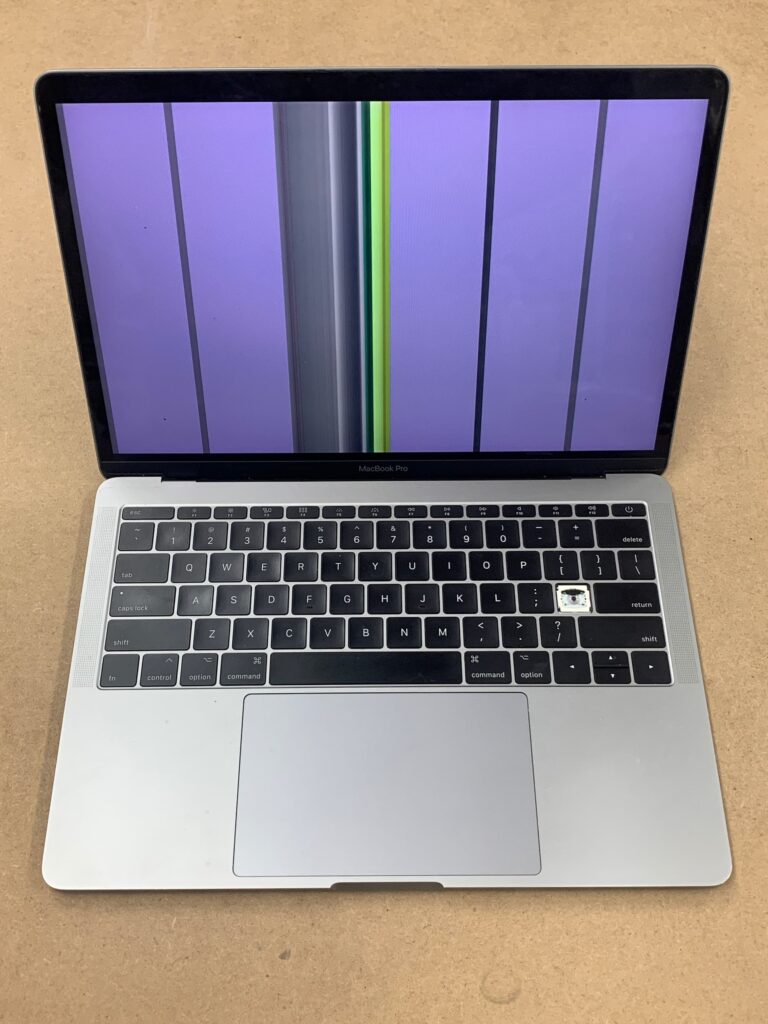
We are seeing this issue more and more with the 2016-2020 MacBook Pro’s. It is being referred to as “Dust Gate”. The term is similar to the Flex Gate name that is associated with another cable that goes bad on these same models. In the video below you can see the small area of damage on the flex cable.
We quoted a turnaround time of 3-5 business days for this repair and a $250 charge for the work. The customer was pleased to be able to have the computer repaired for less than the cost to replace the entire display, so we started working on the device.
To repair the damaged flex cable, we had to run jumpers on the damaged lines. In order to figure out which lines needed we repair, we had to disassemble the Macbook Pro, remove the display assembly from the rest of the laptop, remove the clutch cover and spring flex from the display, and inspect the flex cable with a microscope.
The severity of the “dust gate” issue meant that it required more jumpers than usual. We repaired all the damaged data lines with a jumper wire, applied and cured conformal coating, reassembled the device, and tested it to ensure it worked correctly. The video below shows the conformal coating being cured after the jumper wires were installed.
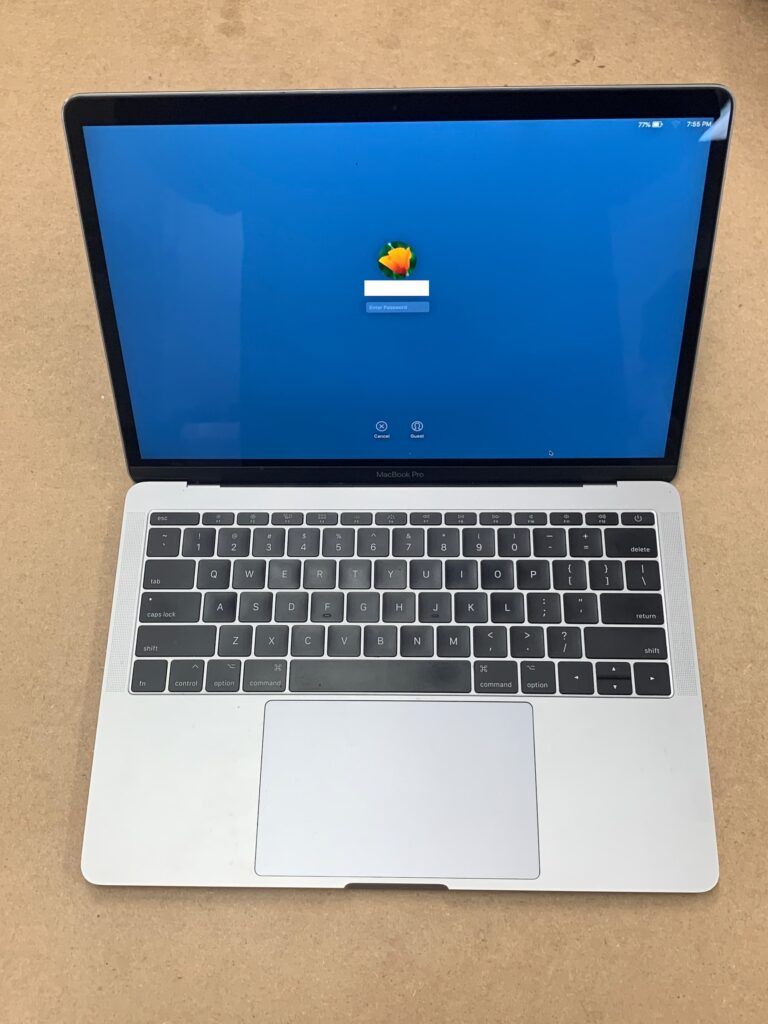
As you can see in the image below, the screen was working as good as new after the repair service.
If you are hoping to not have this issue with your Mac, be sure to regularly clean the area between the display and the body of the laptop with compressed air or similar. It would be best to have your computer serviced annually for a cleaning to keep debris from building up and causing damage over time.
REPAIRING THE APPLE Dust Gate ISSUE YOURSELF
As mentioned earlier, our method of repairing the display Flex cable requires a lot of experience and expertise with micro-soldering. If you are not very confident in your micro-soldering skills, we do not recommend attempting this repair on your own. It can be very frustrating as the soldering points are very small and very close together.
If you want to fix the issue on your own and you don’t have the soldering skills, it would be better to replace the entire display assembly as that is a much easier repair.
Nationwide Dust Gate REPAIR IN PHILLY
Our affordable MacBook Pro Dust Gate repair service is available at our shop here in Philadelphia. We also offer Dust Gate repair nationwide if you would like to mail your computer in for repair.
Our fast turnaround and component-level repair options make us the best choice for MacBook Pro repair services. You can come by anytime with your MacBook for a free diagnosis, or you contact us for a quote over the phone on what you need to be fixed.
Other Repair Services
In addition to Mac repairs, MackTechs provides expert iPhone Repair services for all models, from iPhone 5s to iPhone 17. We also offer iPad Repair including screen replacement and charge port fixes. Contact us or call (215) 914-5775.
Frequently Asked Questions
What is Dust Gate on a MacBook Pro?
Dust Gate is an issue affecting primarily 2016 and 2017 MacBook Pro models where dust particles get trapped between the display layers, causing visible spots, lines, or artifacts on the screen. It can also damage the anti-reflective coating, creating permanent marks on the display.
How much does Dust Gate repair cost?
Dust Gate repair pricing depends on the extent of damage and the specific repair approach needed. We offer free diagnosis to assess your MacBook Pro and provide an upfront quote before any work begins. Contact us at (215) 914-5775 for a quote.
Can Dust Gate be fixed without replacing the entire display?
In many cases, yes. We offer component-level repair options that can address the dust buildup and coating damage without a full display replacement. This is significantly more affordable. We will assess your specific situation during the free diagnosis.
How do I prevent Dust Gate from happening again?
Keep your MacBook Pro in a clean environment and consider using a microfiber cloth between the keyboard and screen when closed. Regular cleaning of the display with appropriate screen cleaners can also help. Avoid using compressed air directly on the display edges.
Do you offer mail-in Dust Gate repair?
Yes, we offer a convenient mail-in repair service for customers outside Philadelphia. Submit your repair request online at fix.macktechs.com, ship your MacBook to us, and we will diagnose, repair, and return it with updates throughout the process.
How long does Dust Gate repair take?
Most Dust Gate repairs are completed within 2-4 business days depending on the approach needed. We offer same-day diagnosis. Walk in to our shop at 4329 Main Street in Manayunk, Philadelphia, or call (215) 914-5775.