MacBook Pro Flexgate Repair Philadelphia
Component-level Flexgate repair for 2016, 2017, and 2018 MacBook Pro models. We fix the stage-light effect and backlight failure caused by a worn display flex cable — without replacing your entire screen. Free diagnosis. Same-week turnaround. Ship from anywhere in the US.
Free Diagnosis
No charge to find the problem
1-Year Warranty
On every Flexgate repair
Microsoldering
Component-level repair
Philadelphia Shop
Walk in or mail in
MacBook Pro Flexgate Repair Cost
Flat pricing by screen size — no hidden fees. All repairs include a 1-year warranty.
What Is Flexgate?
Flexgate is a well-documented design flaw affecting 13" and 15" MacBook Pro models from 2016-2018, and the 16" A2141 from 2019. The backlight flex cable is routed so tightly that it creases every time the lid opens and closes. Over time it fatigues, cracks, and breaks — causing a range of visible backlight problems. It is not the same cable as the one damaged in Dust Gate.
The issue is progressive: it starts as an intermittent flicker at the bottom of the screen and gets worse with every lid open until the backlight fails completely. Apple ran a limited repair program for some 13-inch 2016 models but it has since expired, and the 15-inch and 2017 models were never covered.
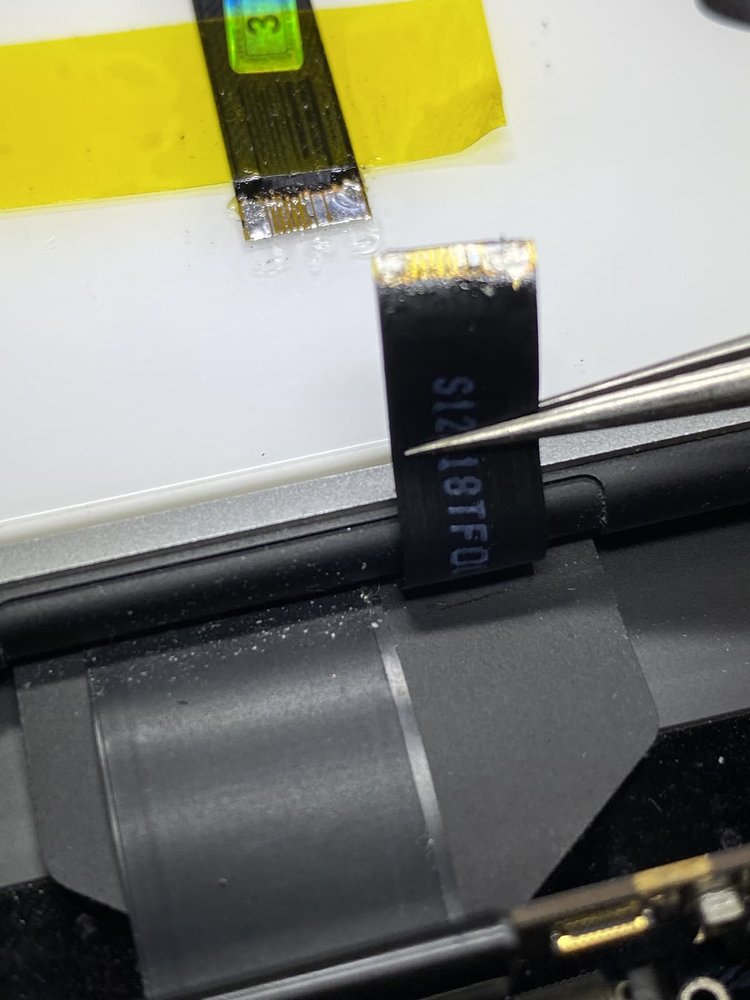
At MackTechs we repair the cable at the component level instead of replacing the entire display assembly — which saves you hundreds of dollars and preserves your original screen.
Flexgate Symptoms
If your MacBook Pro is showing any of these symptoms, you are likely dealing with a Flexgate failure. The sooner you bring it in, the less likely you are to lose the display entirely.
Stage-Light Effect
Uneven backlighting across the bottom of the screen that looks like stage lights — this is the classic Flexgate signature.
Flickering Backlight
The screen flickers or dims intermittently, especially when the lid is opened past a certain angle.
Dark / Black Screen
Complete backlight failure. The display is on but invisible — you can still see a faint image with a flashlight.
Affected MacBook Pro Models
These are the models we most commonly see with Flexgate failures. If your MacBook Pro is not on this list but has matching symptoms, contact us for a free diagnosis — similar failures occasionally show up on adjacent model years.
| Model Year | Screen | Model Number | Our Price |
|---|---|---|---|
| 2016 MacBook Pro | 13-inch | A1706 / A1708 | $199 |
| 2016 MacBook Pro | 15-inch | A1707 | $249 |
| 2017 MacBook Pro | 13-inch | A1706 / A1708 | $199 |
| 2017 MacBook Pro | 15-inch | A1707 | $249 |
| 2018 MacBook Pro | 13-inch Touch Bar | A1989 | $199 |
| 2018 MacBook Pro | 15-inch Touch Bar | A1990 | $249 |
| 2019 MacBook Pro | 16-inch | A2141 | $299 |
Not sure which model you have? Click the Apple menu → About This Mac — the model name and year will be listed, or send us your serial number and we will look it up for you.
Not Flexgate? It May Be Dust Gate
2016-2020 MacBook Pro models also suffer from Dust Gate, a separate failure. Flexgate is the backlight flex cable creasing and breaking. Dust Gate is the display flex cable being worn through by dust, dirt, and debris pressed into it each time the lid closes. If your screen shows bars, fine horizontal lines, or a noisy static-like image — rather than a stage-light effect or the backlight cutting out — you are looking at Dust Gate, which is repaired with an LCD panel replacement.
Our Flexgate Repair Process
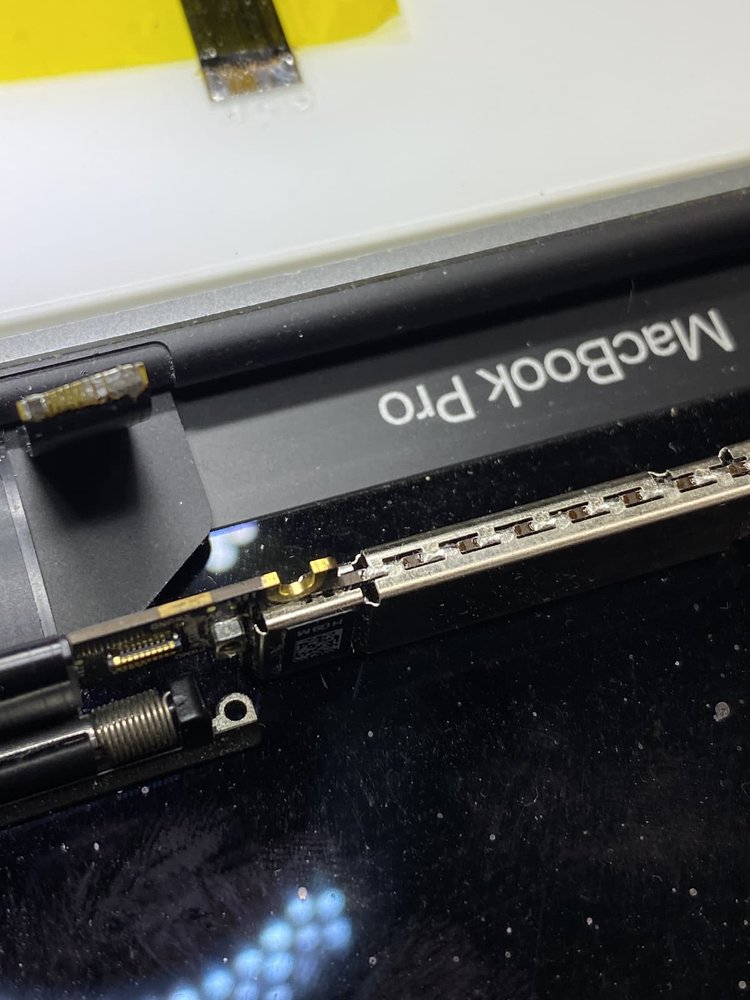
Rather than replacing the entire display assembly (which can run $600 or more at Apple), we extend the damaged flex cable at the component level using precision microsoldering. Here is what happens when you bring in your MacBook Pro:
- Free diagnosis — we verify the failure is Flexgate and not a different display issue. Most diagnoses are done same day.
- Screen disassembly — we carefully open the display housing without damaging the hinge or frame.
- Cable repair — we extend or replace the failing flex cable using microsoldering tools designed for Mac logic board work.
- Reassembly and test — we reseal the display, test it across the full lid-open range, and verify the fix under load.
- Quality check + return — the MacBook gets a final health check and is ready for pickup or return shipping.
Most Flexgate repairs are completed within 2-3 business days. All work is backed by our 1-year warranty.
2017 15" MacBook Pro · Completely Black Screen
A customer from Malvern brought in their 2017 15-inch MacBook Pro with a completely black screen. They mentioned the failure started as intermittent flickering along the bottom of the display, got progressively worse over a few weeks, and eventually blacked out the backlight entirely.
We started with a free diagnosis. Plugging into an external monitor confirmed the logic board, GPU, and display panel were all fine — the problem was isolated to the display backlight circuit, a textbook Flexgate symptom. We opened the display housing, extended the damaged flex cable using microsoldering, reassembled, and tested across the full range of lid motion.
Total cost: $249. Turnaround: 2 business days. The customer paid roughly one-third of what an Apple display assembly replacement would have cost and kept their original screen.
Can I Fix Flexgate Myself?
We get asked this a lot. The honest answer: only if you have professional microsoldering experience. The flex cable solder points are about the size of a pinhead and sit directly on top of the display driver board. One slip damages the driver, which turns a $249 repair into a full display replacement.
If you want to repair it yourself without the microsoldering risk, the alternative is to replace the entire display assembly — which is far more forgiving but significantly more expensive. Genuine Apple display assemblies for affected models typically run $600-800, plus the labor and tools. For most customers the component-level repair makes more sense.
If you are in the Philadelphia region or willing to mail it in, we will handle the microsoldering for you and stand behind the work with a 1-year warranty.
Flexgate Repair FAQ
Ready to Fix Your Flexgate?
Free diagnosis. 1-year warranty. Walk in or ship from anywhere.
